Blackmagic Video Assist 4K 7″ Monitor

In a nutshell

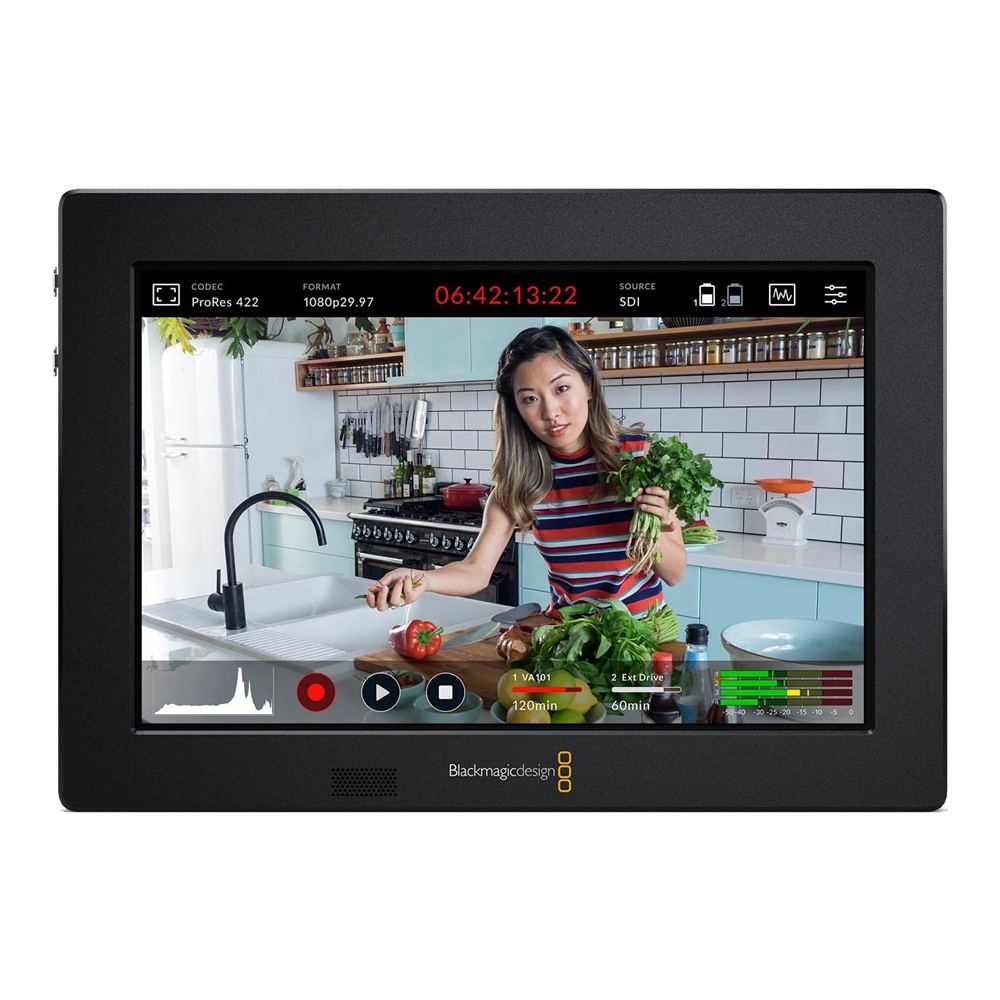
A handy 7″ monitor from blackmagic which was ahead of its time

Both a monitor and recorder designed for DSLRs/mirrorless cameras with 2x SD card slots allowing for HD or Ultra HD recording 10-bit 4:2:2 quality ProRes or DNxHD files.

Category:

The technical lowdown

Now it’s easy to add professional monitoring and recording to any SDI or HDMI camera with Blackmagic Video Assist! You get a super bright touch screen display that’s much larger than the displays found on DSLR cameras, making it easier to accurately set focus and frame shots, plus you get high speed SD card recorders for HD or Ultra HD recording in incredible 10-bit 4:2:2 quality ProRes or DNxHD files.

Thel Video Assist 4K lets you add a bright 7 inch monitor and broadcast quality recorder to any SDI or HDMI camera.

By adding a Video Assist to a DLSR camera you can get a nice large screen that ensures you get perfect focus every time. Video Assist has built in focus aids such as focus peaking and focus zoom. You can also use the histogram to help set exposure. Because Video Assist has built in recorders, you can bypass the low quality video files or even tape based recorders in many cameras.

The Video Assist uses high quality ProRes and DNx recording, so you get great quality and full compatibility with all editing software. You also get much longer recording times because Video Assist 4K features 2 SD card slots, so you can change cards while recording.

The Blackmagic Video Assist 4K features 2 analog audio inputs with phantom power that are connected to an incredibly low noise HD audio circuit. This means you can connect high end microphones and mixers via the balanced mini XLR connectors, and completely bypass the camera audio for amazing results. It’s like Blackmagic Video Assist 4K has a professional audio recorder built in, and with over 128db of audio noise floor, audio engineers will love it!

The design on the inside is just as professional with the latest technology 6G-SDI in and out on full size connectors as well as HDMI 2.0 in and out. There is also a LANC connector for extra control options in addition to the SDI and HDMI record triggers. Also included is an upgradable hardware codec with a selection between ProRes Proxy, ProRes LT, ProRes 422, and ProRes 422 HQ. A 3.5 mm audio output is included so you can plug in headphones for audio monitoring and the Video Assist 4K also includes a speaker for playback.

When it comes to the built in recorder, Video Assist 4K includes support for the latest technology UHS-2 cards, so you get fast speeds for recording to Ultra HD. UHS-2 cards are extremely fast but you can also read them in conventional SD card slots on computers, as they are fully backwards compatible.

Additional information

Apple Logo Arri Logo Blackmagic Design Logo Canon Logo Chrosziel Logo Dedolight Logo DJI Logo GoPro Logo Hawk-Woods Logo IDX Logo Kinoflo Logo Manfrotto Logo Metabones Logo Panasonic Logo Portabrace Logo Rode Logo Samyang Logo Sandisk Logo Sennheiser Logo Sigma Logo Sachtler Logo Small HD Logo Small Rig Logo Sony Logo Sound Devices Logo Tiffen Logo TV Logic Logo Zeiss Logo

Training Course Booking Request

To book in your training please complete the form below. We'll get back to you at the details provided to confirm if your prefered day is available and answer any questions you may have.

This field is for validation purposes and should be left unchanged.
Name(Required)
Email(Required)
Desired Training Date(Required)

Work Experience Request

To request work experience with us please complete the following form.

This field is for validation purposes and should be left unchanged.

Your Personal Information

Your Name(Required)
Your Email Address(Required)
Address(Required)
When is the best time for us to reach you via telephone?

Current Education Level

What level are you currently studying?(Required)
Hours You Are Available(Required)
Monday
Tuesday
Wednesday
Thursday
Friday
 
Please tell us what hours you are available for work experiance each day of the week. Note our standard office hours are 9:30 to 5

Previous Employment

Your Previous Employers
Employer
Dates (From/To)
Position/Role
Reference Details
 
Please list your contact information for any previous or current employers/work experience placements, if applicable. You may leave this section blank if you’ve never had prior work experience placements or employment.

More About You

Please use this section to tell us a little about yourself, your cover note in effect. Why are you interested in undertaking work experience with us and what you hope to get out of it.
Please use this section to tell us a little more about the technical areas you are currently studying and what profession you're looking to go into once you finish your studies.
Accepted file types: pdf, doc, docx, Max. file size: 25 MB.
Please upload your a recent copy of your CV in .pdf, .doc or .docx format

Availability

If you are looking for a specific date for your work experience please tell us here. If you have a flexibility and can offer us range of potential dates, please select the earliest and latest that you would be available.
From
To

Acknowledgments

Freelancers Talent Pool

To request inclusion in our freelancer talent pool please complete the following form.

This field is for validation purposes and should be left unchanged.

Your Personal Information

Your Name
Your Email Address
Address

Skillset

What role skills/roles would you like to be considered for?
Let us know all the apply for you, or if your skillset isn't listed, please use the about you section below to expand upon your skillset.

More About You

Please use this section to tell us a little about yourself, your cover note in effect. Why are you interested in working alongside us, where you are based, any equipment you own or are familiar with etc.
Accepted file types: pdf, doc, docx, Max. file size: 25 MB.
Please upload your a recent copy of your CV in .pdf, .doc or .docx format

Acknowledgments